
My Logitech G13 WoW Setup
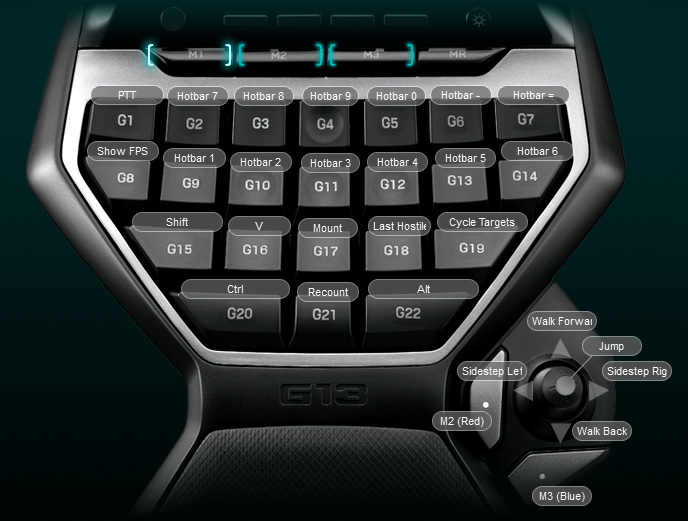
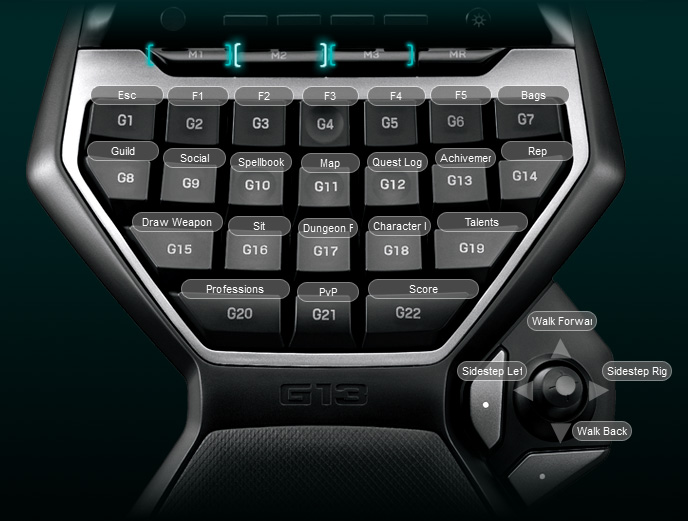
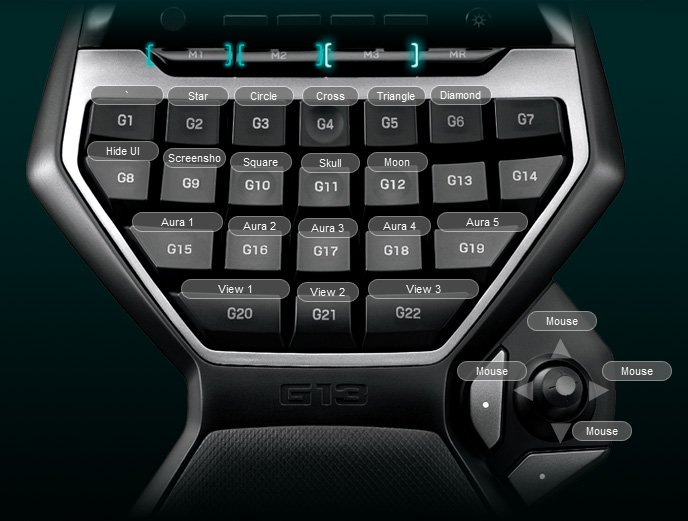
I have my Logitech G13 broken down into three different states: M1 (default), M2 (red) and M3 (blue). By default the gamepad will always be in the M1 state. However, I have the Logteich software setup to allow me to momentarily shift into M2 and M3 while I have the two buttons below the thumbsticks pressed down. That way, I don’t have to manually press the M2 or M3 buttons at the top of the keypad to access any of the red or blue buttons. The colors by the way, correspond to the LCD backlight coloring for each state as well as my N52 setup. This is generally how I tried to organize each of the three states:
M1 (Default): Frequjently used items, combat abilities and regular shift modifiers (Shift, Control and Alt)
M2 (Red): Blizzard interface elements such as the guild screen, map, professions as well as party targets (F1 through F5).
M3 (Blue): Raid icons, auras, screenshotting, camera views and other stuff.
The new gamepad software, version 6, will allow you to assign a button that will toggle you into any of the M states by right clicking on a button and going to Edit > Fuction. If you are using the old software, version 3.0.6, you will need to add a script (included below). FYI: I have G23 assigned to M2 and G24 assigned to M3. If you prefer another configuration, that shouldn’t be too hard to change.
function OnEvent(event, arg, family)
if ( family == “lhc” ) then
if ( event == “G_PRESSED” ) then
if ( arg == 23 ) then
SetMKeyState(2, family);
end
if ( arg == 24 ) then
SetMKeyState(3, family);
end
elseif ( event == “G_RELEASED” ) then
if ( arg == 23 ) then
SetMKeyState(1, family);
end
if ( arg == 24 ) then
SetMKeyState(1, family);
end
end
end
end
Keys G9, G10 and G11 are where I naturally rest my ring, middle and index fingers. I tried to keep important abilities centralized around this area. It’s worth noting that, to avoid any possible EULA violations, I don’t use the G13 to script anything that couldn’t already be macro’d in game. I have quite a few items bound to awkward key combinations in game (Shift + Control + F1 to toggle Recount for example). Not so easy to press on a normal keyboard, trivial to bind on a gamepad. Also, I have jump, autorun and 4 or 5 other things bound to my mouse.
If anyone is interested, my configuration file is included in the zip file posted below. Beware, it’s highly customized to my awkward in-game keybindings…
Screemberry
Is this profile still available?
Pingback: How To Bind Autorun Wow | Information